Chrome extension · Hebrew · Arabic · Persian

Right-to-left, the way it was supposed to look.

SuperRTL fixes right-to-left rendering on the AI chat sites you use every day — Claude, ChatGPT, Copilot, DeepSeek, Slack, Canva and Manus. One Google account, every device.

14-day free trial No credit card Zero analytics
Live demo

Try it live

Flip the toggle. Same Hebrew text, two universes.

RTL fix Off
AI Chat
אפשר דוגמה לפונקציה fibonacci(n) ב-Python?
בטח. הפונקציה fibonacci(n) מחזירה את האיבר ה-n בסדרה (החל מ-0).

Code stays LTR — only prose flips.

Proof

Before & after

Real screenshots from supported sites.

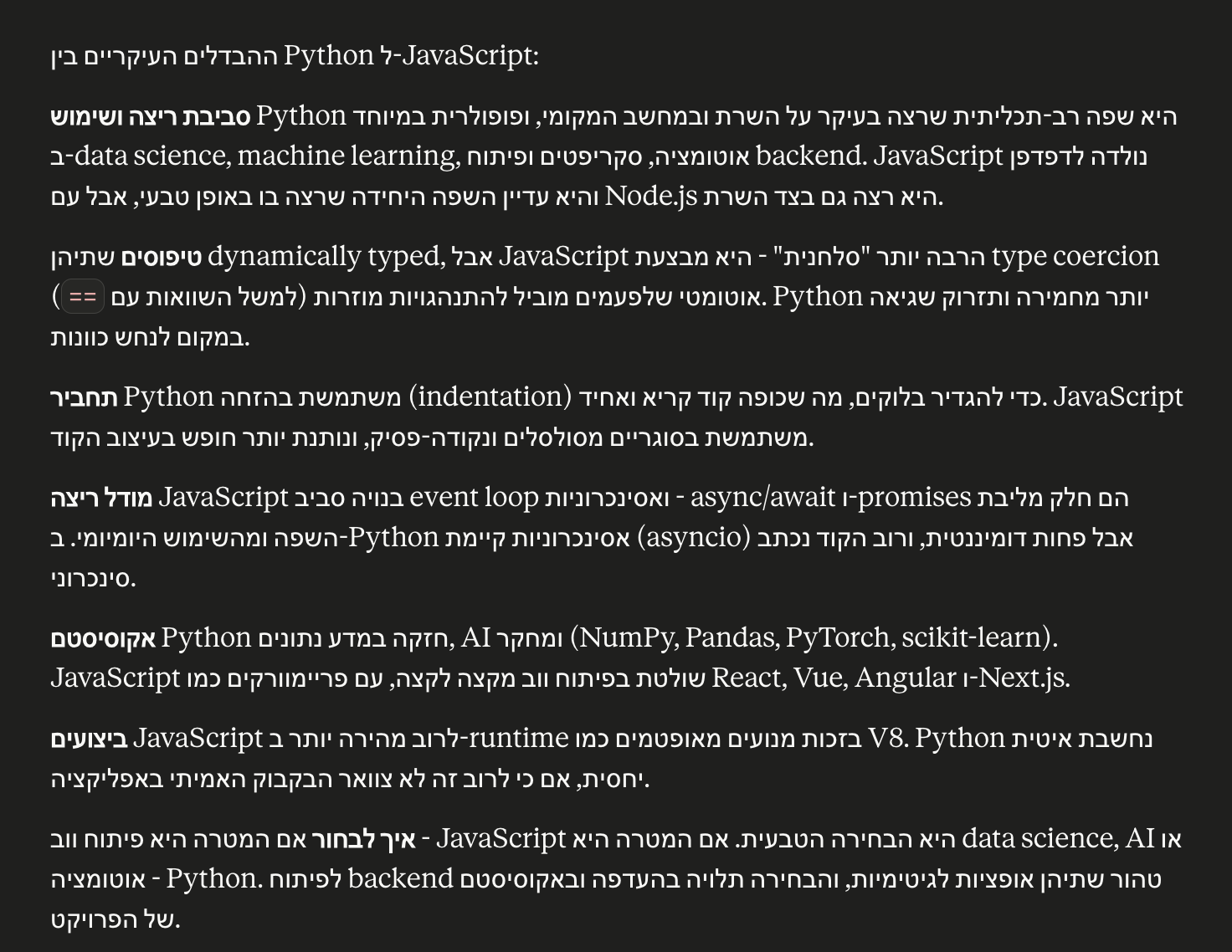
Screenshot showing Hebrew text rendered incorrectly without the extension
Without SuperRTL: Hebrew sentences break apart, parentheses jump to the wrong side.
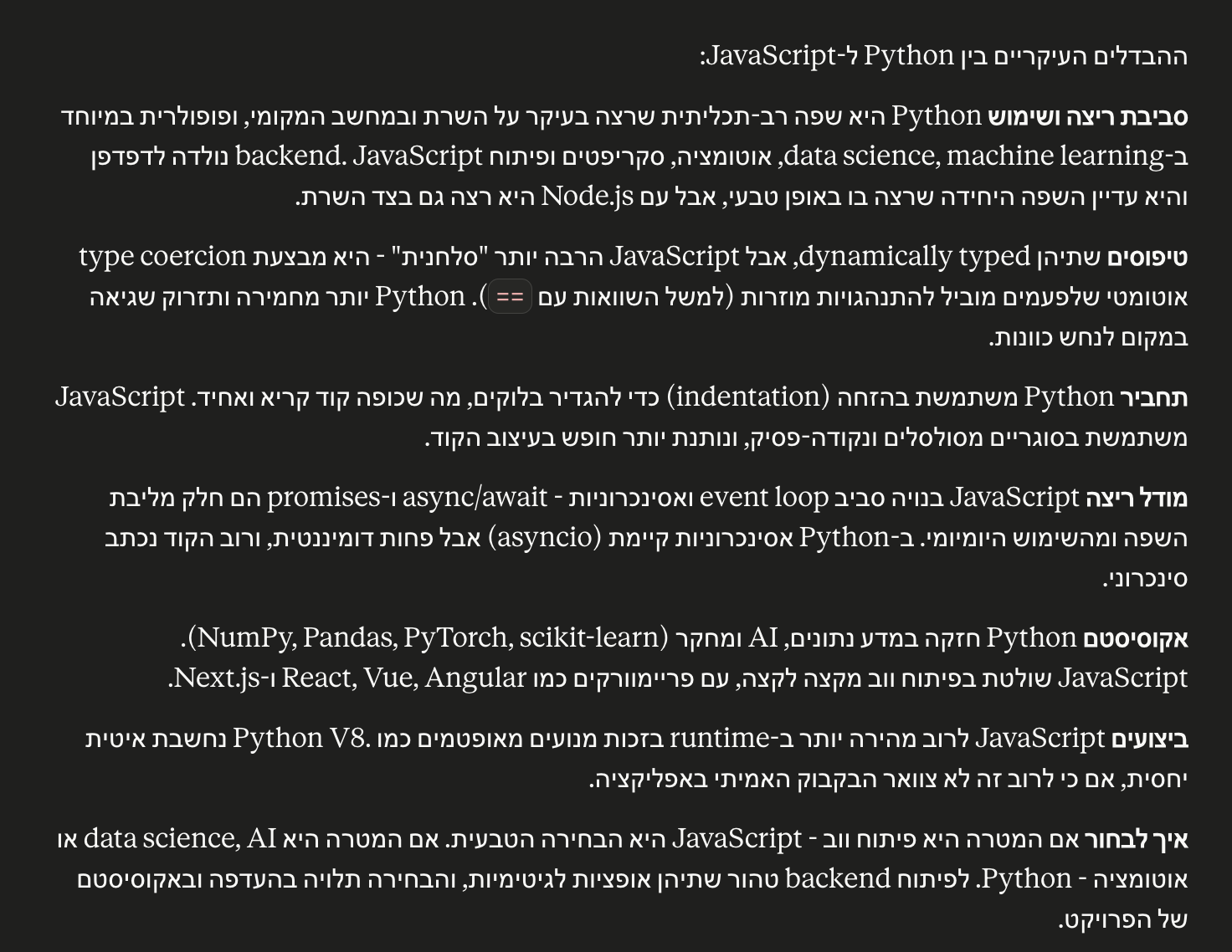
Screenshot showing the same Hebrew text with the extension active
With SuperRTL: clean direction, correct punctuation, readable sentences.
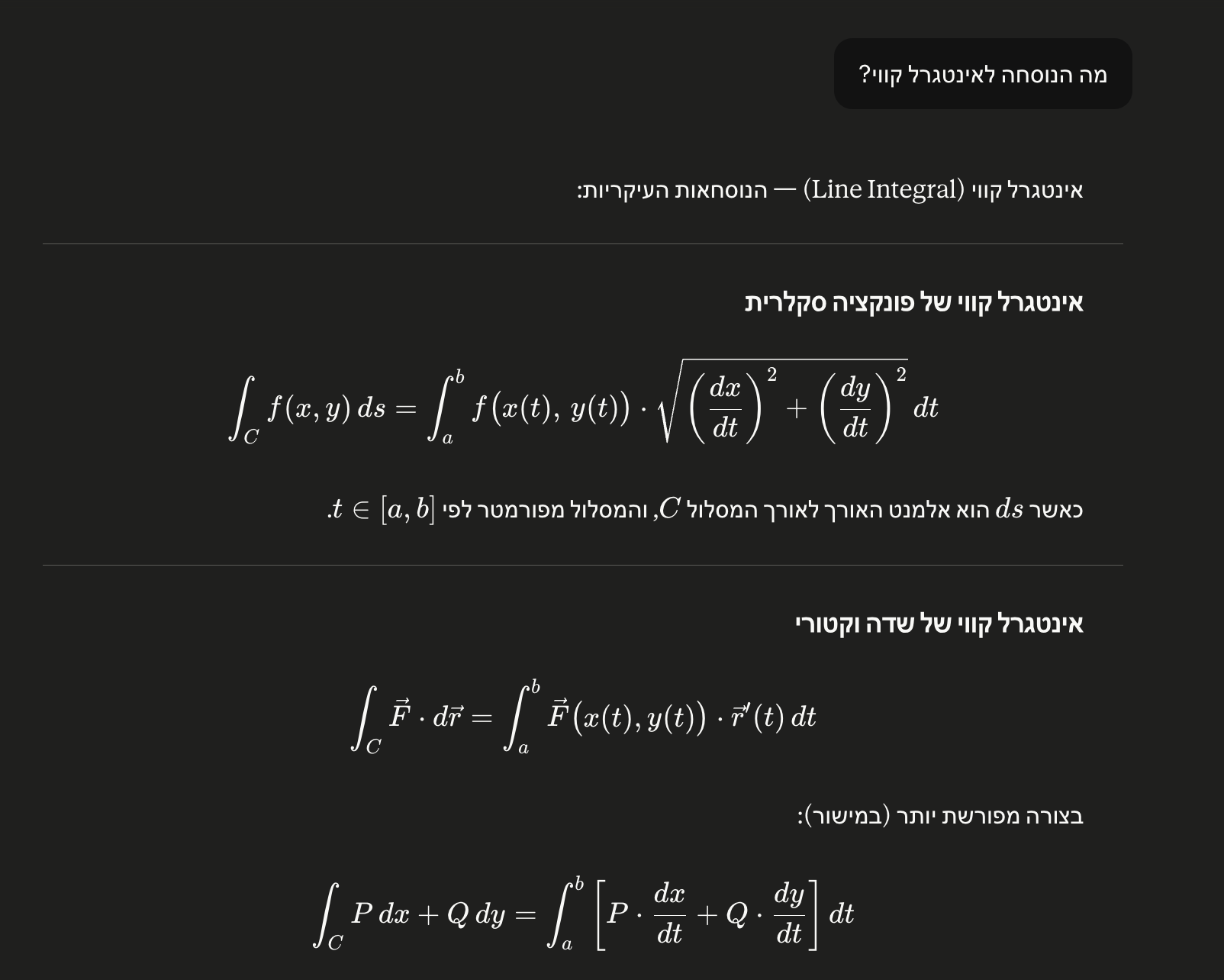
Screenshot showing math formulas and code remaining LTR while body text is RTL
Math formulas and code stay LTR automatically — only prose flips.
Coverage

Works automatically on

Seven sites today, more on request.

  • Claude
  • ChatGPT
  • Copilot
  • DeepSeek
  • Slack
  • Canva
  • Manus

Banking and medical sites are intentionally excluded — the extension never loads there.

Heads up

Sites with built-in RTL

A few AI sites (Google Gemini, Perplexity, Grok, NotebookLM) have added their own native right-to-left rendering. On those sites, running our extension on top may cancel out their fix and re-flip the text back to LTR. If you notice this, open the extension's side panel (click the SuperRTL icon in Chrome's toolbar), find the site at the top, and uncheck "Enable RTL on this site" — the extension will skip it from then on. The keyboard shortcut Alt+R also toggles RTL for the current tab.

How it works

How it works

Install once. Sign in with Google. That's it.

  1. Install from the Chrome Web Store

    One click. No build steps, no config file, no permissions you didn't ask for.

  2. Sign in with Google

    Your subscription is tied to your Google account — not the computer. Use it on every device you own.

  3. Open any supported AI chat site

    The extension detects Hebrew, Arabic or Persian automatically and fixes the direction in place.

Pricing

Pricing

One plan. Per Google account. All your devices.

Recommended

Personal

39/ year

Per Google account · all your devices · annual auto-renew

  • 14-day free trial, no card required
  • Tied to your Google account, not your computer
  • Unlimited devices for the same account
  • Email support
  • Cancel renewal anytime
Add to Chrome — start free trial

Secure checkout via PayPal. Prices include applicable VAT. Subscription auto-renews annually until cancelled.

Important — please read before buying. SuperRTL is a digital product delivered immediately upon subscription. By subscribing and starting to use the product, you waive the 14-day cancellation right under section 14ג(ד) of the Israeli Consumer Protection Law for already-supplied digital goods. You may cancel renewal at any time, but the current paid period is non-refundable.
FAQ

Frequently asked questions

Which AI chat sites are supported?
Claude, ChatGPT, Copilot, DeepSeek, Slack, Canva and Manus. The extension activates automatically on those sites and stays inactive everywhere else.
What happens after the 14-day trial?
The RTL fix stops applying until you subscribe. The extension itself stays installed; subscribe at any time and resume seamlessly.
Can I use my account on multiple devices?
Yes. Your subscription is tied to your Google account, not to a specific computer.
What if I reinstall Chrome or get a new computer?
Just install the extension and sign in with the same Google account. No re-purchase, no support ticket. Your subscription is portable.
Refund policy?
Because SuperRTL is a digital product delivered immediately, there are no refunds for the current billing period. You can cancel auto-renewal at any time from inside the extension; you'll keep access until the period ends.
Do you collect any data?
No traditional user database. The extension requests only the openid scope from Google, so it receives just your opaque account identifier (sub) — no email, no name. That is stored alongside your PayPal subscription id and per-domain settings on your own Chrome profile via chrome.storage.sync. To validate the subscription, the extension sends your Google access token to our Cloudflare Worker, which derives your sub server-side and keeps a minimal subscription record (no email, no name, no IP) so that only you can read your status. The extension never reads or transmits the content of your AI chats. See the privacy policy for full details.
How do I get support?

Stop fighting your browser. Start reading.

14-day free trial. ₪39 per Google account per year after that.

Add to Chrome — free